
Can you put a screw into a drill? Yes, you absolutely can! That’s precisely what a drill driver is designed for. This guide will walk you through every step, ensuring you master the art of fastening with your drill. Whether you’re a seasoned DIYer or just starting, we’ll cover everything from selecting the right bits to achieving perfect results.
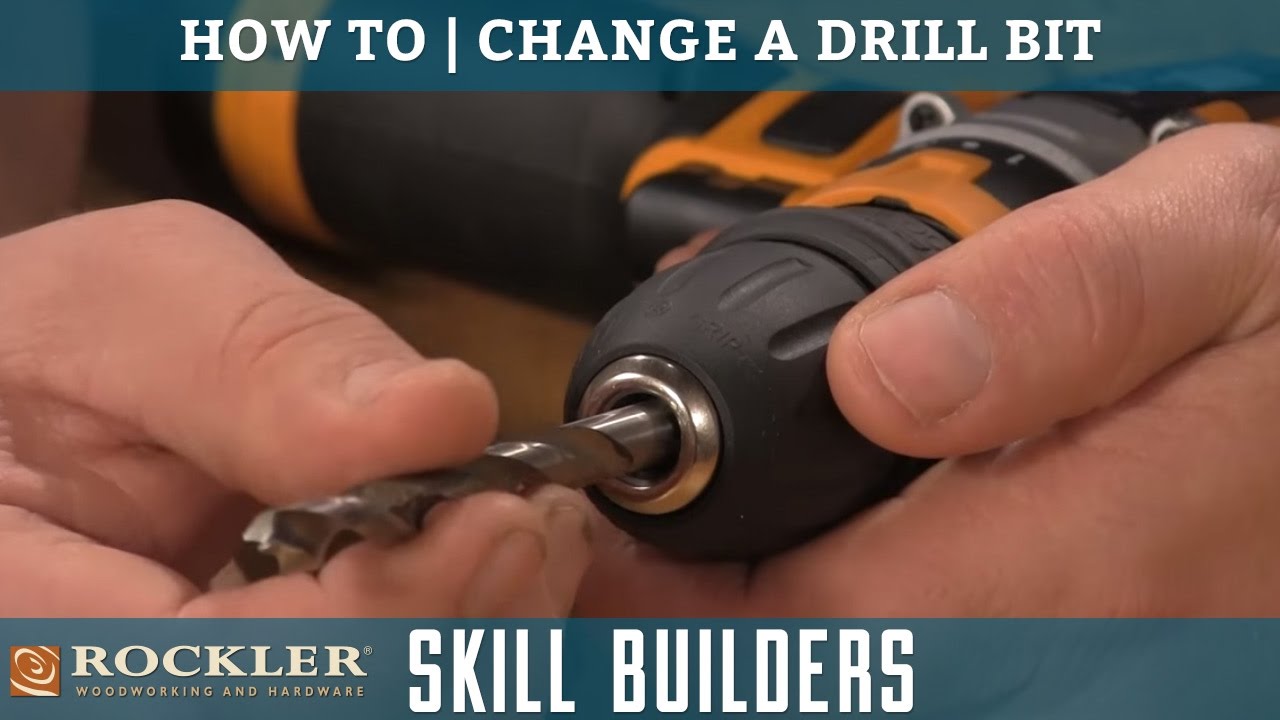
Image Source: i.ytimg.com
Choosing the Right Tools for the Job
Before you can even think about putting a screw into your drill, you need the right equipment. This is where a little preparation goes a long way. Imagine trying to hammer a nail with a wrench – it’s inefficient and ineffective. The same applies to drilling and fastening.
The Drill Driver: Your Powerhouse
Your drill driver is the core of this operation. These versatile tools are designed for both drilling holes and driving screws. Unlike a simple drill, a drill driver usually has a clutch that allows you to control the amount of torque applied, which is crucial for preventing over-tightening or stripping screws.
Key Features of a Drill Driver:
- Variable Speed Control: Allows you to start slow and speed up as needed.
- Forward/Reverse Switch: Essential for driving screws in and backing them out.
- Adjustable Clutch: The magic ingredient for controlling torque.
- Drill Chuck: The part that holds your drill bit or screw bit.
The Importance of the Right Bit
This is arguably the most critical piece of the puzzle. The bit is what actually engages with the screw head. Using the wrong screw bit or screwdriver bit is a common mistake that can lead to stripped screw heads and frustration.
Types of Screw Heads and Their Corresponding Bits:
| Screw Head Type | Common Bit Type | Visual Description | Usage |
|---|---|---|---|
| Phillips | Phillips (PH) | Cross-shaped slot | Very common, good for general-purpose fastening. |
| Pozidriv | Pozidriv (PZ) | Similar to Phillips but with four extra smaller slots | Offers better grip and less cam-out than Phillips, often used in Europe. |
| Slotted | Slotted (SL) | Single straight slot | Older style, less common in modern applications due to cam-out issues. |
| Torx | Torx (T) | Star-shaped slot | Excellent torque transfer, resistant to cam-out, found in electronics and automotive. |
| Hex (Allen) | Hex (H) | Hexagonal (six-sided) slot | Common in furniture assembly and machinery. |
Pro Tip: Always match the screwdriver bit to the exact type and size of the screw head. A PH2 bit is different from a PZ2 bit, even though they look similar. Using the wrong one will damage the screw.
Beyond the Drill Driver: Other Tools to Consider
While a drill driver is ideal, you might encounter situations where other tools are useful:
- Impact Driver: These tools deliver rotational force with percussive blows. They are excellent for driving long screws or into tough materials because they provide more power and less torque reaction on your wrist. When using an impact driver, you must use impact-rated bits, as standard bits can break under the force.
- Screw Gun: A specialized tool designed specifically for driving screws. They often have a depth-setting nose cone to ensure all screws are driven to the same depth, making them ideal for drywall installation.
The Core Process: Attaching the Bit to Your Drill
This is the fundamental step. Let’s break it down.
Navigating the Drill Chuck
The drill chuck is the mechanism at the front of your drill that holds the drill bit or screw bit. Most modern drills have a keyless chuck, meaning you can tighten and loosen it by hand.
Steps to Insert a Screw Bit:
- Ensure the Drill is Off: Always make sure the drill is switched off and unplugged (if corded) before changing bits. Safety first!
- Locate the Chuck: It’s the round, metal part at the very front of your drill.
- Identify the Chuck Jaws: You’ll see three metal pieces that come together.
- Open the Chuck: Most keyless chucks have two sleeves. Grip the rear sleeve firmly and rotate the front sleeve counter-clockwise (when looking from the front). You’ll see the jaws open wider.
- Insert the Screw Bit: Take your chosen screw bit (the metal shank) and insert the non-driving end (the part that looks like a small screw head) into the center of the opened chuck jaws. Push it in as far as it will go.
- Close the Chuck: Grip the front sleeve of the chuck and rotate it clockwise. You will feel it tighten around the bit. Continue rotating until it feels snug and secure. You might hear a clicking sound as the clutch engages if your drill has a self-tightening chuck.
- Test the Grip: Gently tug on the bit to ensure it’s held firmly. It shouldn’t wobble or feel loose. A quick, low-speed spin of the drill with the trigger lightly squeezed can also help seat the bit.
What if My Chuck is Keyless?
Keyless chucks are the most common. You just need to grip and twist as described above.
What if My Chuck Requires a Key?
Older drills might have a keyed chuck. In this case, you’ll insert the chuck key into one of the holes on the chuck’s side and turn it to open or close the jaws.
Loading the Screw: Connecting Bit and Fastener
Now that your screw bit is securely in the drill chuck, it’s time to pick up the screw.
Picking Up the Screw
This is where the magnetic tip on many screw bits comes in handy.
- Align the Bit: Position the tip of the screw bit directly over the head of the screw you intend to drive.
- Engage the Screw: Gently press the screw head onto the bit. If your bit has a magnetic tip, it will usually hold the screw in place. If not, you might need to steady the screw with your fingers initially.
- Hold Steady: Keep the screw firmly pressed against the bit. Your drill driver will do the rest of the work in securing it to the bit.
The Fastening Process: Driving the Screw
This is the main event! Here’s how to drive a screw effectively.
Setting the Torque Clutch
The adjustable clutch on your drill driver is your best friend for successful fastening. It prevents you from over-tightening the screw, which can strip the head or damage the material you’re working with.
Deciphering the Torque Settings:
The numbers on the clutch ring represent torque levels. Higher numbers mean higher torque.
- Low Numbers (e.g., 1-5): For delicate materials or small screws where you want minimal force.
- Medium Numbers (e.g., 6-15): General-purpose use for wood and moderately hard materials.
- High Numbers (e.g., 16+): For driving longer screws or into harder materials.
- Drill Setting (often a symbol of a drill bit): This setting bypasses the clutch entirely, providing maximum torque for drilling holes. Make sure you don’t use this for driving screws unless you are very experienced and the material requires it.
How to Choose the Right Torque Setting:
This takes some practice and depends on:
- Screw Size: Smaller screws generally need lower torque.
- Material Hardness: Softer materials (like drywall or softwoods) require less torque than hardwoods or metal.
- Screw Length: Longer screws might require slightly higher torque to drive fully.
Recommendation: Start with a lower torque setting and gradually increase it until the screw is driven flush with the surface without stripping. You’ll know you’ve reached the right setting when the clutch starts to “click” just as the screw head becomes flush.
Driving the Screw: Step-by-Step
- Position the Screw: Place the tip of the screw against the desired location. If you are screwing into wood, it’s often beneficial to create a pilot hole.
- Create a Pilot Hole (Optional but Recommended): A pilot hole is a small hole drilled before the screw. It guides the screw and prevents the material from splitting, especially in hardwoods or near edges. Use a drill bit slightly smaller than the screw’s shank diameter.
- Start Slow: Place the screw bit firmly into the screw head. Squeeze the trigger gently to start the screw. This helps it go in straight.
- Maintain Pressure: Apply consistent, downward pressure on the drill. Keep the drill perpendicular to the surface to prevent the screw from going in crooked.
- Increase Speed: As the screw begins to bite, increase the trigger pressure for more speed.
- Listen and Feel: Pay attention to the sound and feel. When you hear the clutch “clicking,” it means you’ve reached the preset torque limit. Stop pressing the trigger at this point.
- Back Out the Bit: Once the screw is driven flush, release the trigger. If the bit is stuck, switch the drill to reverse and gently back it out.
Common Challenges and How to Overcome Them
Even with the best intentions, you might run into a few snags.
Stripped Screw Heads
This happens when the screwdriver bit slips out of the screw head, damaging the slot.
- Prevention: Use the correct bit size and type. Apply firm, consistent pressure. Start slowly. Set your clutch correctly.
- Cure: If the screw is still proud of the surface, try using a rubber band between the bit and the screw head for extra grip. If that fails, specialized screw extractor bits are available.
Stripped Screw Holes
This occurs when the screw can no longer grip the material because the hole has become too large or the threads are damaged.
- Prevention: Proper torque setting is key. Avoid over-driving screws.
- Cure: You can try removing the screw, filling the hole with wood glue and toothpicks or golf tees, letting it dry, and then redrilling a pilot hole before re-inserting the screw.
Material Splitting
This is common when driving screws into wood, especially near edges or in hardwoods.
- Prevention: Always use a pilot hole that is slightly smaller than the screw’s shank. This removes material and provides a clean path for the screw.
Over-Driving Screws
This is when the screw goes too deep into the material.
- Prevention: Use the adjustable clutch correctly. Practice on scrap material. Many drills have a depth-stop collar for precise drilling depths.
Working with Different Materials
The material you’re fastening into significantly impacts the fastening process.
Wood
- Softwoods (Pine, Fir): Relatively easy to drive screws into. Use a medium torque setting. Pilot holes are recommended for longer screws or to prevent splitting near edges.
- Hardwoods (Oak, Maple): Require more force. Higher torque settings and a properly sized pilot hole are crucial to prevent splitting and ensure the screw drives straight.
Drywall
- Lightweight and brittle: Use a low to medium torque setting.
- Pilot holes are not typically needed unless you are screwing into a wooden stud behind the drywall.
- Depth control is vital to prevent the screw from tearing through the drywall paper. Many screw guns and drill drivers have depth-setting collars for this.
Metal
- Requires pre-drilling: You must drill a hole before inserting a screw into metal. Use a drill bit specifically designed for metal.
- Self-tapping screws: These screws have a special tip that can cut their own threads as they are driven.
- Higher torque may be needed: Depending on the metal’s thickness and hardness.
Frequently Asked Questions (FAQ)
Q1: What is the difference between a drill bit and a screw bit?
A1: A drill bit is designed to cut holes in materials. A screw bit (or screwdriver bit) is designed to engage with the head of a screw and drive it. While some tools can do both, the bits themselves are distinct.
Q2: Can I use a regular drill to drive screws?
A2: Yes, most modern drills are “drill drivers” and can drive screws. However, they might lack the adjustable clutch that helps prevent over-tightening. If your drill doesn’t have a clutch, you’ll need to be extra careful with trigger control and listen for the screw to stop turning easily.
Q3: How do I know which screw bit to use?
A3: Match the screw bit to the shape of the screw head. Phillips bits for Phillips screws, Torx bits for Torx screws, etc. Also, ensure the size of the bit matches the size of the screw head slot to prevent stripping.
Q4: What is a pilot hole for?
A4: A pilot hole is a small hole drilled before inserting a screw. It guides the screw, prevents the material from splitting (especially wood), and makes driving the screw easier, particularly into harder materials.
Q5: How tight should a screw be?
A5: A screw should be driven until it is snug and flush with the surface of the material. Over-tightening can strip the screw head or hole, or even damage the material. Using the torque setting on your drill driver is the best way to achieve proper tightness.
Q6: Can I use a regular drill bit to drive screws?
A6: No. A drill bit is designed for cutting holes and does not have the profile to engage with a screw head. You need a screw bit or screwdriver bit for driving screws.
Q7: What is an impact driver for?
A7: An impact driver is designed for driving screws and bolts with high torque. It uses percussive blows to help drive fasteners, making it ideal for tough jobs and long screws. You must use impact-rated bits with an impact driver.
Mastering the art of putting a screw into a drill and driving it effectively is a fundamental skill for anyone engaging in DIY projects or repairs. By selecting the right tools, understanding your drill’s capabilities, and practicing careful technique, you’ll be confidently fastening with precision in no time. Remember, patience and the right bit are your greatest allies.