
Can you get perfect cuts with a miter saw? Yes, by ensuring your miter saw is properly calibrated. This guide will show you how to calibrate your miter saw for precise cuts every time.
Calibrating a miter saw is a crucial step for anyone serious about woodworking, from hobbyists to seasoned professionals. A well-calibrated miter saw ensures that your cuts are accurate, repeatable, and precisely at the angles you set. This saves you time, reduces material waste, and ultimately leads to higher quality projects. This comprehensive guide will walk you through the process of miter saw calibration, covering everything from the basic miter saw zero setting to advanced fence adjustments.
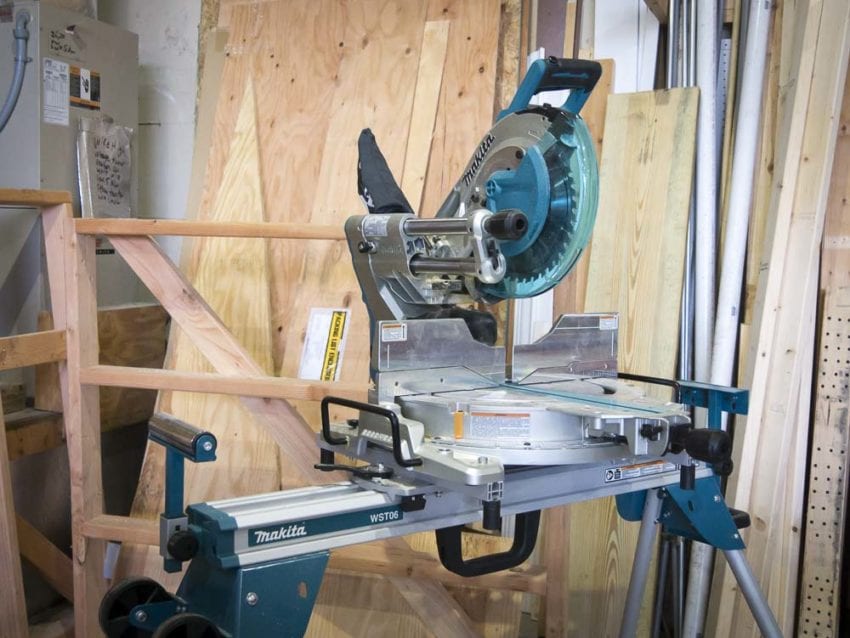
Image Source: www.protoolreviews.com
Why Miter Saw Calibration Matters
Think of your miter saw as a precision instrument. Just like a chef needs a sharp knife or a painter needs a clean brush, a woodworker needs a miter saw that performs as intended. When a miter saw is out of calibration, even the simplest tasks become frustrating. A slight misalignment can turn a 90-degree cut into a slightly angled one, which is unacceptable when you’re building furniture, installing trim, or crafting intricate joinery.
Here’s why proper miter saw alignment and calibration are vital:
- Achieving Precise Angles: Whether you’re cutting a 45-degree angle for a picture frame or a compound angle for crown molding, accuracy is paramount. Calibration ensures the saw’s angle indicators are true.
- Repeatability: When you need to make multiple identical cuts, a calibrated saw ensures consistency. You can set an angle once and trust that every subsequent cut will be the same.
- Material Savings: Incorrect angles lead to ill-fitting joints and wasted wood. Accurate cuts minimize errors and reduce the need for costly material replacements.
- Improved Project Quality: The final appearance and structural integrity of your woodworking projects directly depend on the precision of your cuts. Calibrated miter saws contribute to a professional finish.
- Safety: While not directly a calibration point, a properly aligned saw, especially its fence and blade path, contributes to safer operation by ensuring the material is held securely and the blade cuts cleanly.
Essential Tools for Miter Saw Calibration
Before you begin, gather these essential tools. Having the right tools makes the calibration process much smoother and more accurate.
- Accurate Measuring Tools:
- Combination Square: A good quality combination square is indispensable for checking 90-degree angles.
- Digital Angle Gauge or Protractor: For precise angle measurements beyond 90 degrees and for setting bevels.
- Tape Measure: For general measurements and checking the fence.
- Marking Tools:
- Pencil: For marking.
- Screwdrivers and Wrenches: To make adjustments. The specific types will depend on your miter saw model.
- Safety Glasses: Always wear safety glasses when working with power tools.
- Scrap Wood: You’ll use this for test cuts. Choose a flat, stable piece of material.
- Miter Saw User Manual: Your saw’s manual is the best resource for specific adjustment points and procedures.
Step-by-Step Miter Saw Calibration
Miter saw calibration typically involves checking and adjusting two main angles: the miter angle (horizontal angle) and the bevel angle (vertical angle). We’ll also cover fence alignment.
Phase 1: The Miter Saw Zero Setting and Miter Angle Calibration
The miter angle is the horizontal pivot of the saw head. Most commonly, you’ll want to ensure that when the indicator shows 0 degrees, the blade is perfectly perpendicular (90 degrees) to the fence and the table.
Step 1: Initial Inspection and Safety Check
- Unplug the Saw: Always disconnect power before making any adjustments.
- Inspect for Damage: Look for any visible damage to the saw, blade, or fence. Ensure the blade is sharp and properly installed.
- Clean the Saw: Remove any sawdust or debris from the table, fence, and any moving parts. This ensures smooth operation and accurate readings.
Step 2: Checking the 90-Degree Miter Setting (Miter Saw Zero Setting)
This is the most frequent and critical miter saw alignment. A perfect 90-degree cut is the foundation for many woodworking projects.
- Position the Saw Head: Swing the saw head to its leftmost detent (if applicable) and then swing it back to the 0-degree mark. Ensure it locks securely into place.
- Place Your Square: Lay your combination square on the saw’s table so that its fence rests firmly against the saw’s fence.
- Position the Blade: Lower the blade so it is just touching the tongue of the square. The blade should be perfectly parallel to the blade of the combination square.
- Check for Gaps: Look for any gaps between the blade and the square. If the blade is touching the square along its entire length, your 0-degree setting is accurate. If there’s a visible gap, it means your miter angle needs adjustment.
Step 3: Adjusting the Miter Angle (Setting Miter on Miter Saw)
Most miter saws have an adjustment screw or mechanism to fine-tune the 0-degree miter setting.
- Locate the Adjustment Screw: Refer to your miter saw’s user manual to find the specific screw for miter angle adjustment. It’s typically located near the miter detent mechanism or at the pivot point.
- Make Small Adjustments:
- If the blade is cutting slightly “off square” (meaning it’s not a true 90 degrees), you’ll need to turn the adjustment screw.
- If the gap is at the top edge of the blade, you might need to tighten the screw on that side or loosen the one on the opposite side. If the gap is at the bottom, do the opposite.
- Crucially, make very small turns. A tiny turn can significantly change the blade angle. After each adjustment, lower the blade to check with your square again.
- Re-check at 0 Degrees: Once you believe you have the 0-degree setting accurate, unplug the saw, re-plug it, and check again with your square. Repeat the adjustment process until the blade is perfectly perpendicular to the fence.
Step 4: Testing Other Common Miter Angles
Once the 0-degree setting is perfect, test other common angles like 45 degrees.
- Set the Miter to 45 Degrees: Swing the saw head to the 45-degree mark and ensure it locks securely.
- Use a Digital Angle Gauge: Place your digital angle gauge on the saw table against the blade’s edge. Alternatively, use your combination square’s protractor function.
- Check the Angle: The gauge should read precisely 45 degrees relative to the fence. If it doesn’t, there might be an issue with the detent stops or the overall miter scale. Some saws have fine-tuning screws for the detent stops. Again, consult your manual for specific instructions.
- Make Test Cuts:
- Take a piece of scrap wood.
- Cut off a small end at the 0-degree setting and check its perpendicularity with your square.
- Then, set the miter to 45 degrees and make a cut. Place the cut ends together to form a corner. They should meet perfectly without any gaps. If there’s a small gap, the angle is slightly off.
Phase 2: Bevel Angle Calibration
The bevel angle refers to the tilt of the blade from the vertical plane. This is used for making angled cuts on the face of the wood.
Step 1: Checking the 90-Degree Bevel Setting (No Tilt)
This ensures that when the bevel adjustment is set to 0 degrees, the blade is perfectly vertical.
- Set the Bevel to 0: Ensure the saw head is not tilted. Most saws have a prominent 0-degree detent. Lock it firmly in place.
- Place Your Square: Place your combination square on the saw table, with its blade resting against the side of the saw blade.
- Check for Perpendicularity: The saw blade should be perfectly parallel to the blade of the combination square. There should be no gaps.
- Adjust the Bevel Angle (Setting Bevel on Miter Saw):
- Locate the bevel adjustment screw. This is usually found at the base of the pivoting saw arm.
- Similar to the miter adjustment, make very small turns to adjust.
- If the blade leans slightly inwards at the top, you might need to adjust the screw that controls the forward tilt. If it leans outwards, you’ll need to adjust the screw that controls the backward tilt.
- The goal is to have the blade perfectly vertical when the indicator reads 0 degrees. Check with your square after each minor adjustment.
Step 2: Checking and Adjusting Common Bevel Angles (e.g., 45 Degrees)
- Set the Bevel to 45 Degrees: Tilt the saw head to the 45-degree mark and ensure it locks securely.
- Use a Digital Angle Gauge: Place your digital angle gauge on the saw table against the side of the blade.
- Verify the Angle: The gauge should read 45 degrees relative to the table.
- Make Test Cuts:
- Take a piece of scrap wood.
- Make a cut with the bevel set to 45 degrees.
- Turn the piece of wood over and make another cut at 45 degrees on the opposite side.
- When you join the two cut edges, they should form a perfectly flat surface if the bevel angle is accurate.
Phase 3: Fence Calibration and Miter Saw Cutting Guide
The fence is a critical component for supporting the workpiece and ensuring square or angled cuts. A properly calibrated fence is crucial for miter saw accuracy.
Step 1: Ensuring the Fence is Square to the Blade at 0 Degrees
This is a vital aspect of miter saw alignment. Even if your 0-degree miter angle is correct, if the fence isn’t perpendicular to the blade’s path, your cuts will still be inaccurate.
- Check Blade to Fence at 0 Degrees: With the saw head at 0 degrees (checked in Phase 1), place your combination square against the fence. Then, place the blade of the square against the side of the saw blade.
- Look for Gaps: There should be no gap between the saw blade and the square’s blade. The saw blade should be perfectly parallel to the square’s blade.
- Adjusting the Fence:
- Many fences on miter saws are adjustable. Look for screws that attach the fence to the base.
- Loosen these screws slightly.
- Use your combination square to align the fence so it is perfectly at 90 degrees to the blade.
- Hold the fence firmly in place and tighten the screws.
- Important: Ensure the saw blade is not installed or is retracted completely when making fence adjustments to avoid contact.
Step 2: Fence Height and Stability
- Fence Height: The fence should be tall enough to support the workpiece adequately, especially when making bevel cuts. If the fence is too low, the top of the workpiece might tilt during the cut, leading to inaccuracies. Most miter saws come with a fence that is sufficiently tall, but if yours isn’t, consider adding an extension or ensuring the workpiece is placed securely against the existing fence.
- Fence Stability: The fence must be rigidly mounted and not wobble. If it’s loose, tighten any mounting screws. A wobbly fence will result in inconsistent cuts.
Step 3: Using the Fence as a Miter Saw Cutting Guide
Once calibrated, the fence acts as your primary guide.
- Support the Workpiece: Always push your workpiece firmly against the fence and keep it there throughout the cut.
- Secure Against the Fence: For angled cuts, ensure the workpiece is still held snugly against the fence.
Phase 4: Blade-to-Arbor Alignment and Other Checks
While less common for DIY calibration, ensuring the blade is perfectly centered on the arbor and runs true is important.
- Blade Runout: Excessive side-to-side wobble of the blade as it spins is called runout. This is usually caused by a bent blade, a damaged arbor, or a loose blade nut.
- Check: Spin the blade slowly by hand (with power off!) and observe if the blade wobbles significantly.
- Fix: If the blade is bent, replace it. If you suspect arbor damage, it’s best to have the saw inspected by a professional. Ensure the blade nut is tight.
- Arbor Flange Centering: The flanges that hold the blade should be clean and centered on the arbor.
- Table Flatness: Ensure the saw table itself is flat and not warped. This is a manufacturing tolerance issue but worth noting if you consistently get odd results.
Fine-Tuning and Ongoing Maintenance
Calibration isn’t a one-time event. Some elements of your miter saw can shift over time with use.
- Regular Checks: Make it a habit to check your 0-degree miter and bevel settings periodically, especially after transporting the saw or if you notice any inaccuracy in your cuts.
- Impact of Dust: Sawdust accumulation can affect the accuracy of detents and angle indicators. Clean your saw regularly.
- Blade Condition: A dull or damaged blade can bind, flex, and cause inaccurate cuts, even on a perfectly calibrated saw. Keep your blades sharp and clean.
- Depth Stop Calibration: Many miter saws have a depth stop for making dados or grooves. Ensure this is set accurately if you use it. Check it against a ruler.
Troubleshooting Common Miter Saw Calibration Issues
| Problem | Potential Cause | Solution |
|---|---|---|
| 90-degree miter cut is off | Miter adjustment out of alignment | Re-calibrate the 0-degree miter setting using the adjustment screw. |
| 45-degree miter cut is inaccurate | Miter detent stop is off or scale is misaligned | Adjust the miter detent stop screw or recalibrate the scale if possible (consult manual). |
| Bevel cut is not square | Bevel adjustment out of alignment | Re-calibrate the 0-degree bevel setting using the adjustment screw. |
| Workpiece binds or cuts unevenly | Fence not square to blade, or loose fence | Calibrate the fence to be perpendicular to the blade at 0 degrees. Tighten fence mounting screws. |
| Inconsistent cut angles | Saw not locked securely at angle, or loose pivot | Ensure the saw head is locked firmly. Check for play in the pivot mechanism. |
| Blade wobbles excessively | Bent blade, loose blade nut, or damaged arbor | Replace blade, tighten blade nut, or have arbor inspected by a professional. |
| Readings on the angle scale are wrong | Scale misaligned or needs recalibration | Adjust scale alignment or recalibrate detent stops as per manual. |
| Top of cut is angled inward/outward | Bevel angle adjustment needs fine-tuning | Adjust bevel pivot screws to achieve a perfectly vertical 0-degree bevel. |
Frequently Asked Questions About Miter Saw Calibration
Q: How often should I calibrate my miter saw?
A: It’s a good practice to check your calibration every few months or if you notice any inconsistencies in your cuts. Transporting the saw or heavy use can cause it to go out of alignment.
Q: Can I calibrate my miter saw without a digital angle gauge?
A: Yes, you can achieve good results using a high-quality combination square for 90-degree checks. For precise angle measurements beyond 90 degrees, a digital gauge is highly recommended for best miter saw accuracy.
Q: My miter saw has a loose fence. What should I do?
A: A loose fence is a common issue. Check for screws securing the fence to the saw base and tighten them. If the fence itself is warped, it might need replacement, although this is less common.
Q: Is miter saw cutting guide calibration the same as fence calibration?
A: Yes, the fence acts as your primary cutting guide, so calibrating the fence ensures that your cuts are guided accurately.
Q: What is the miter saw zero setting?
A: The miter saw zero setting refers to calibrating the saw so that when the miter angle indicator is set to 0 degrees, the blade is perfectly perpendicular (90 degrees) to the fence. This is the starting point for most accurate woodworking saw calibration.
Q: My saw’s bevel indicator doesn’t match the actual angle.
A: This means your miter saw angle adjustment for the bevel needs to be recalibrated. You’ll need to find the specific adjustment screw for the bevel tilt on your saw and make small turns until the indicator is accurate at 0 and other common angles.
By following these steps, you can ensure your miter saw is perfectly calibrated, leading to the perfect cuts that every woodworker strives for. Consistent accuracy in your cuts will elevate the quality of your projects and make your woodworking experience much more enjoyable. Remember to always prioritize safety and consult your miter saw’s user manual for model-specific adjustment procedures.